Level 1 vs Level 2 vs Level 3 Market Data: Order Book Explained
Level 1 vs Level 2 vs Level 3 Market Data: Order Book Explained
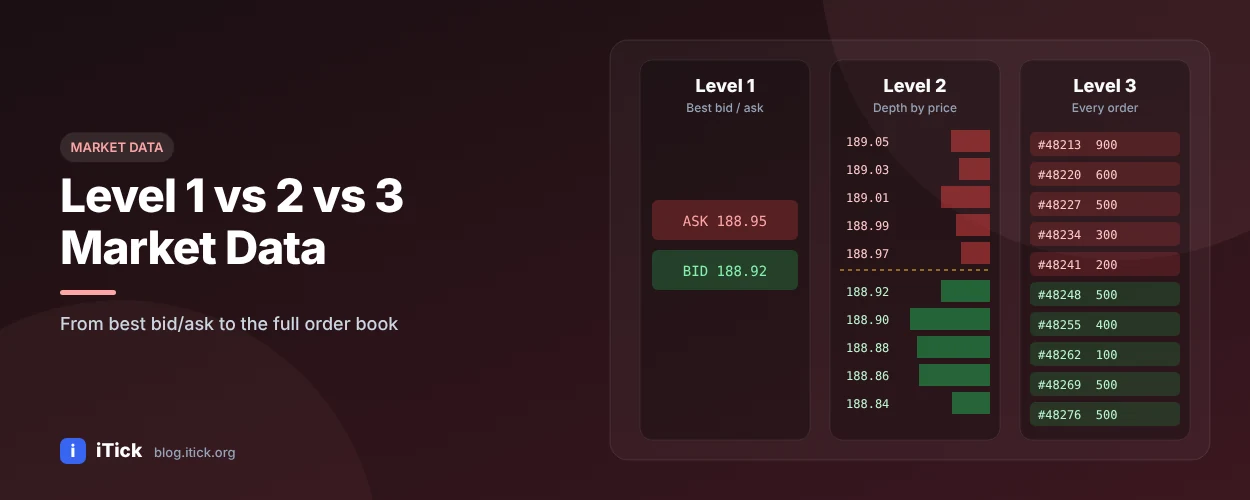
Market data is sold and displayed in "levels". Each level reveals more of what is happening inside the market - from a single best price to the full queue of orders. Knowing the difference helps you choose the right data feed and avoid paying for detail you don't need (or trading without detail you do need).
Level 1 market data
Level 1 is the top of the book:
- Last traded price and size
- Best bid (highest buy price) and best ask (lowest sell price)
- Bid and ask sizes at those prices
- Day open, high, low, volume, change
Level 1 is enough for watchlists, portfolio valuation, price alerts and most long-term investing.
Level 2 market data
Level 2 shows the order book depth - multiple price levels on both sides with the quantity waiting at each one.
Example Level 2 order book
| Bid size | Bid | Ask | Ask size | |
|---|---|---|---|---|
| 1,200 | 100.02 | 100.03 | 800 | |
| 3,500 | 100.01 | 100.04 | 2,100 | |
| 2,800 | 100.00 | 100.05 | 4,600 | |
| 5,100 | 99.99 | 100.06 | 1,900 | |
| 7,400 | 99.98 | 100.07 | 3,300 |
Illustrative values.
How to read it:
- The spread is 100.03 − 100.02 = 0.01.
- Liquidity near the price is visible - a market order to buy 5,000 shares would fill across several ask levels.
- Imbalances (much more size on the bid than the ask) can hint at short-term pressure, though large orders can be cancelled at any time.
Level 3 market data
Level 3 goes beyond aggregated depth. It is traditionally the access level for registered market makers and exchange members, who can not only see the full book but also enter, modify and cancel quotes directly. In modern data terms you may also see "Level 3" used for order-by-order (market-by-order) feeds, where every individual order is visible rather than the total per price level.
Most retail traders and app developers never need Level 3.
Comparison table
| Level 1 | Level 2 | Level 3 | |
|---|---|---|---|
| Best bid/ask | Yes | Yes | Yes |
| Depth (multiple price levels) | No | Yes | Yes |
| Individual orders | No | No (aggregated) | Yes / order-by-order |
| Quote entry | No | No | Market makers |
| Typical users | Investors, apps | Day traders, algos | Market makers, exchanges |
| Data volume | Low | High | Very high |
Where tick data fits in
Levels describe quotes (the order book). Tick data describes trades - every execution with price, size and time. Many strategies combine Level 2 depth with tick-by-tick trades to understand both intent (orders) and action (fills).
Who needs Level 2 data?
- Day traders and scalpers who need to see liquidity before entering.
- Execution algorithms that slice large orders to minimise market impact.
- Market microstructure research (spread, depth, order book imbalance).
- Trading platforms offering depth-of-market (DOM) ladders to users.
Getting Level 2 data via API
iTick provides Level 1 quotes and Level 2 depth for supported stock and futures markets through REST and WebSocket. Depth changes many times per second, so streaming is the better choice (why WebSocket beats polling).
      import json
import websocket  # pip install websocket-client

TOKEN = "YOUR_API_TOKEN"

def on_open(ws):
    # quote = Level 1, depth = Level 2, tick = trades
    ws.send(json.dumps({"ac": "subscribe", "params": "700$HK,AAPL$US", "types": "quote,depth,tick"}))

def on_message(ws, message):
    msg = json.loads(message)
    print(msg)

ws = websocket.WebSocketApp("wss://api.itick.org/stock", header={"token": TOKEN},
                            on_open=on_open, on_message=on_message)
ws.run_forever(ping_interval=20)
For a one-off snapshot of the book, call GET https://api.itick.org/stock/depth?region=HK&code=700. Depth levels available differ by exchange - see the docs.
FAQ
What is Level 2 market data? It is order book depth: several bid and ask price levels with the volume at each.
Is Level 2 data worth it? For active intraday trading and execution, usually yes. For long-term investing, Level 1 is enough.
What is Level 3 market data? The level used by market makers to see and enter quotes; also used to describe order-by-order data feeds.
Access depth and tick data
Explore the iTick tick data and Level 2 API or start free to test quote, depth and tick streams.